




Description
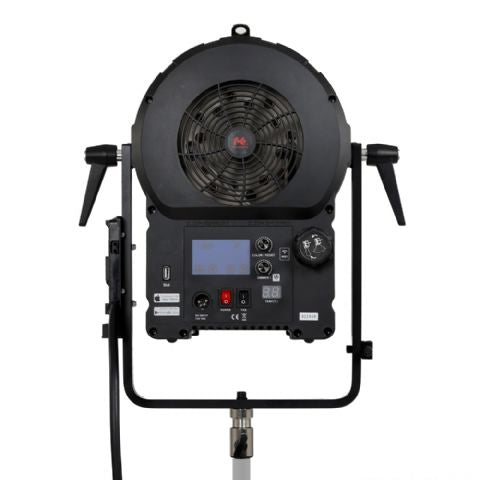
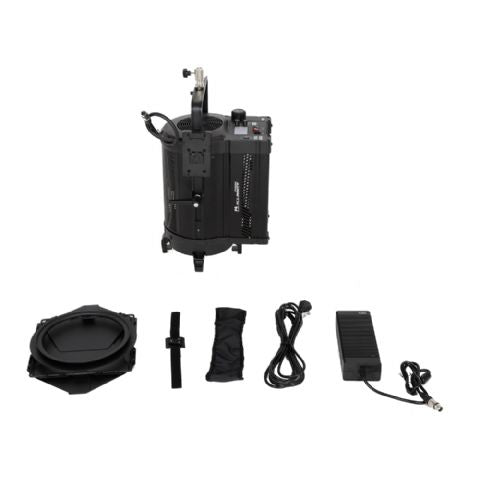
The Falcon Eyes DLL-3000TW (300W) is a new high-power Bi-Color LED spotlight with adjustable color temperature, dimmable control, WiFi function, and adjustable focus. This lamp is extremely suitable for film, music video, and documentary shoots, as well as a light source for stage performances. The aluminum housing makes the lamp suitable for use in various conditions.
- High power Bi-Color LED spotlight
- Adjustable color temperature
- Dimmable control
- WiFi function
- Adjustable focus
- Suitable for film, music video, and documentary shoots
- Suitable as a light source for stage performances
- Aluminum housing
The lamp is equipped with a Fresnel lens, which causes the light beam to gradually fade to dark along the edges. The illumination angle is adjustable from 20 to 60 degrees.
V-mount battery
The DLL-3000TW can be powered by a V-mount battery. An external V-mount holder is included. The lamp can also be connected to a power outlet with the included power cable and adapter.
With or without V-mount?
If you want the same lamp without V-mount capability, the CLL variant might be more interesting. This lamp only works on mains power. Optional accessories can be used to customize the lamp.
Control with smartphone app
In addition to operation via the screen and rotary knobs on the back, the lamp can also be controlled with a smartphone. Free apps are available in the App Store and Play Store. The color temperature and brightness can be easily adjusted.
Single lamp
- Download the Falcon Eyes app on your iPhone or Android smartphone.
- Connect to the Wi-Fi network that starts with 'LEDS...' and use the password 'candlehome'.
- Open the Falcon Eyes app and press 'Click me'.
- Click on the block with the IP address starting with 192.
- Adjust the brightness with the slider at the bottom and adjust the color temperature by swiping across the round disk in the middle.
Multiple lamps
- Download the Falcon Eyes app on your iPhone or Android smartphone.
- Connect a Wi-Fi router to a power outlet and connect to the Wi-Fi network.
- Press and hold the color/reset button of the lamp until the red light flashes twice.
- Open the Falcon Eyes app and press 'Click me'.
- Press the gear icon in the top right and enter the password of your Wi-Fi router.
- Wait until the app connects and the red lights of all LED lamps light up continuously red.
- Press a lamp of your choice and adjust the brightness and color temperature.
Special features of Falcon Eyes Fresnel lamps are the special Fresnel lens and adjustable beam. These lamps are often used in theaters, TV studios, and film locations due to their large amount of light and ability to illuminate at greater distances. In addition, Fresnel lamps get less hot than traditional spotlights.
Payment & Security
Related products


Recently viewed



About Fietsenwinkel.be

Fietsenwinkel.be is the online bicycle specialist of Belgium and the Netherlands since 2015. Part of Tormino B.V. (CoC: 84663545). Specialist expertise and competitive prices through bulk purchasing.

